
Battery at a glance
See your QC45 battery level without reaching for another device.
Battery, listening modes, EQ, audio controls, and automatic reconnection — all from one focused Windows app.
Requires Bose QuietComfort 45 headphones paired with a compatible Windows PC.
 QCBridge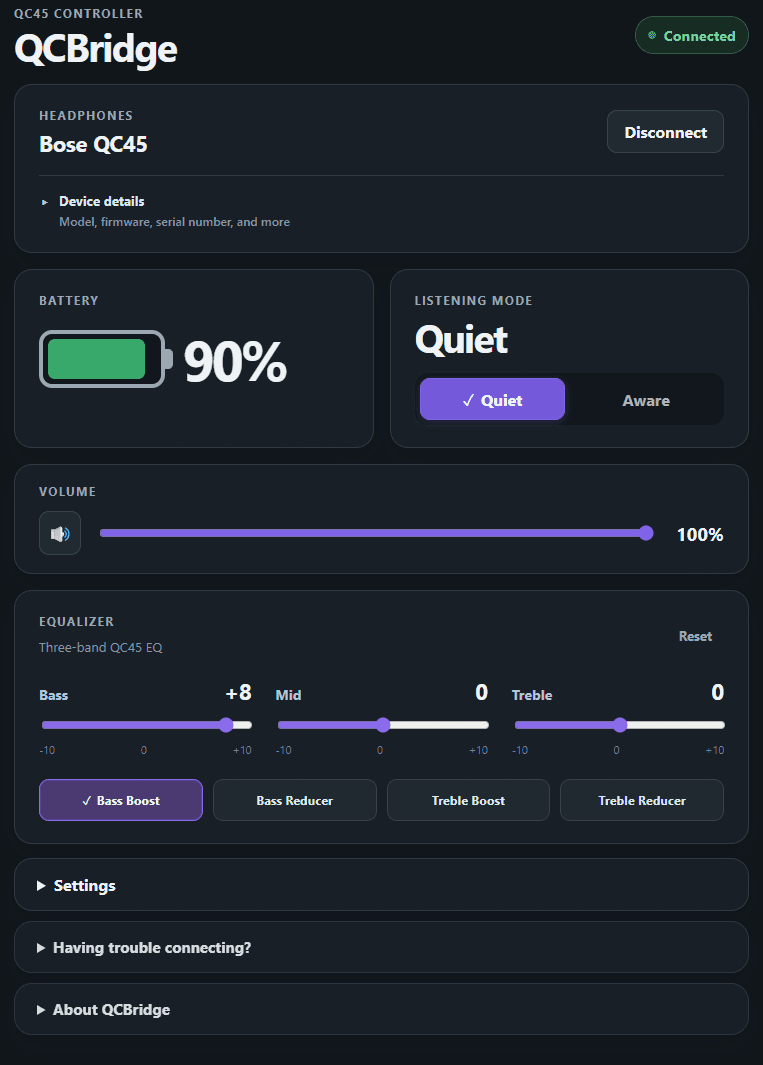
QCBridge focuses on the things you actually want close at hand while using your QC45 on Windows.
See your QC45 battery level without reaching for another device.
Switch listening modes directly from your Windows desktop.
Adjust bass, mids, and treble or jump between your favorite presets.
QCBridge can reconnect when your headphones power back on or Windows resumes.
Keep your most-used QC45 controls available while the main window stays out of the way.
View model, firmware, product information, and the active Windows audio profile.
Launch QCBridge with Windows, start minimized, or keep it running from the system tray. Automatic connection and reconnection help restore your session after headphones are powered back on, Bluetooth returns, or Windows resumes from sleep.
See all features →QCBridge processes supported headphone and Windows audio information locally. There are no user accounts, ads, analytics, telemetry, or third-party tracking.
Read the privacy policyAvailable as a one-time purchase through the Microsoft Store.